Sessions
Inspect every execution of your workflows view conversation history, Token state, variables, and errors.
A Session is a single runtime execution instance of a Process. Every time an end user starts a conversation, makes a phone call, or sends a Slack message to a deployed Process, a new Session is created. The Sessions page lists all Sessions across your Workspace so you can monitor, debug, and audit workflow behavior.
How it works
When a Process is triggered via a Channel, the engine creates a Session and a Token. The Token moves through the Process diagram, executing Tasks node by node. Each step is recorded in the Session, including input/output data, variable state, and any errors. Once the Token reaches an End Event, the Session is marked as completed.
Fields
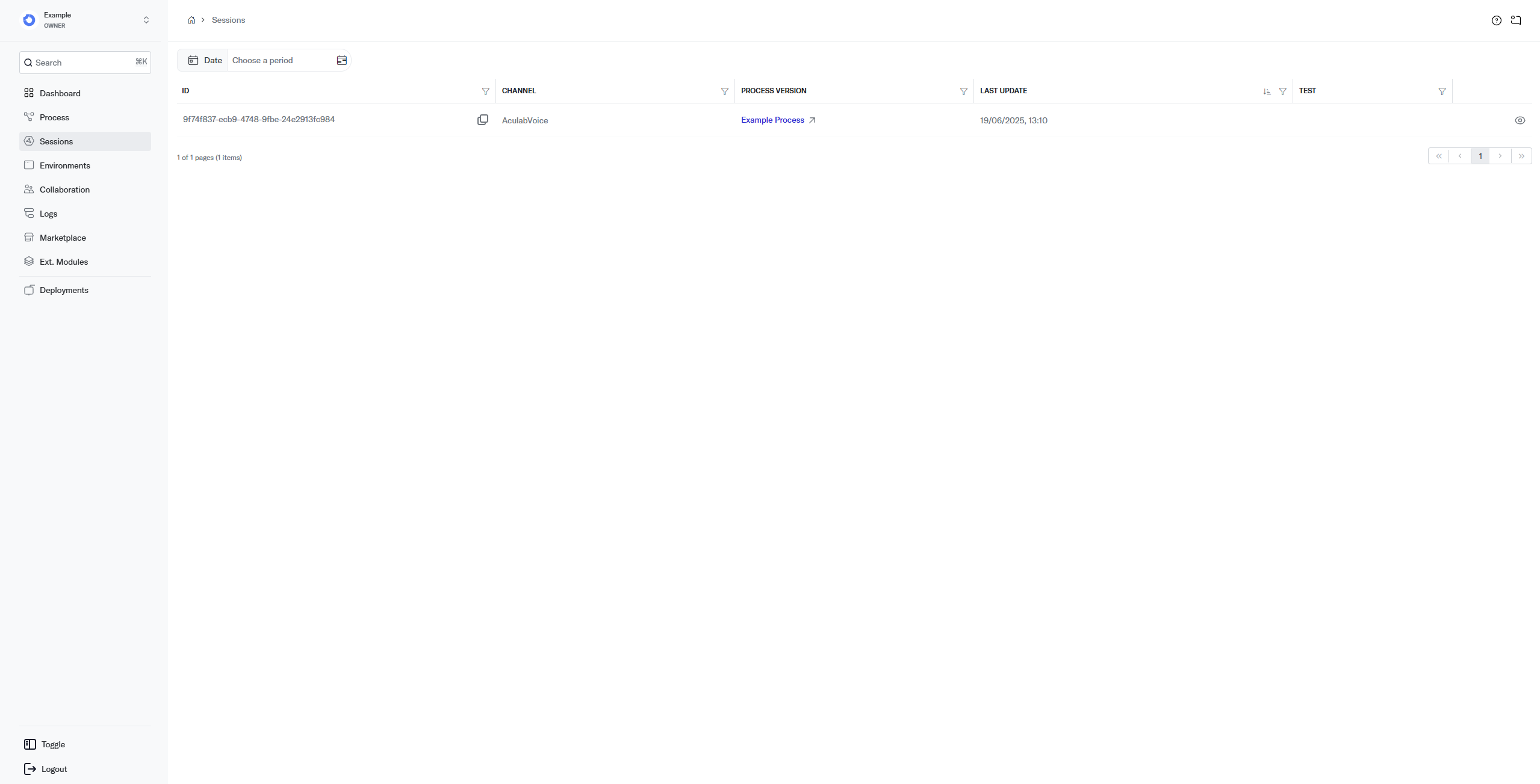
- Id unique identifier of the Session. Useful when contacting support.
- Channel the Channel used to execute the Session (e.g.,
Chat,AculabVoice,SlackChannel). - Tag the outcome tag the workflow set with SetTagTask (e.g.,
resolved,escalated); empty when the Session was never tagged. Use the Tag filter to list the Sessions with one or more tags, or type a tag in the search box. - Process Version the version of the Process that ran. Clicking the link opens that version in the editor.
- Last Update date and time of the most recent state change (e.g., status update).
- Test indicates whether the Session was generated from a test Environment.
- Eye icon opens the Session Details page. You can also click anywhere on the row.
Session Details
The detail view gives you full visibility into what happened during a Session.
Execution
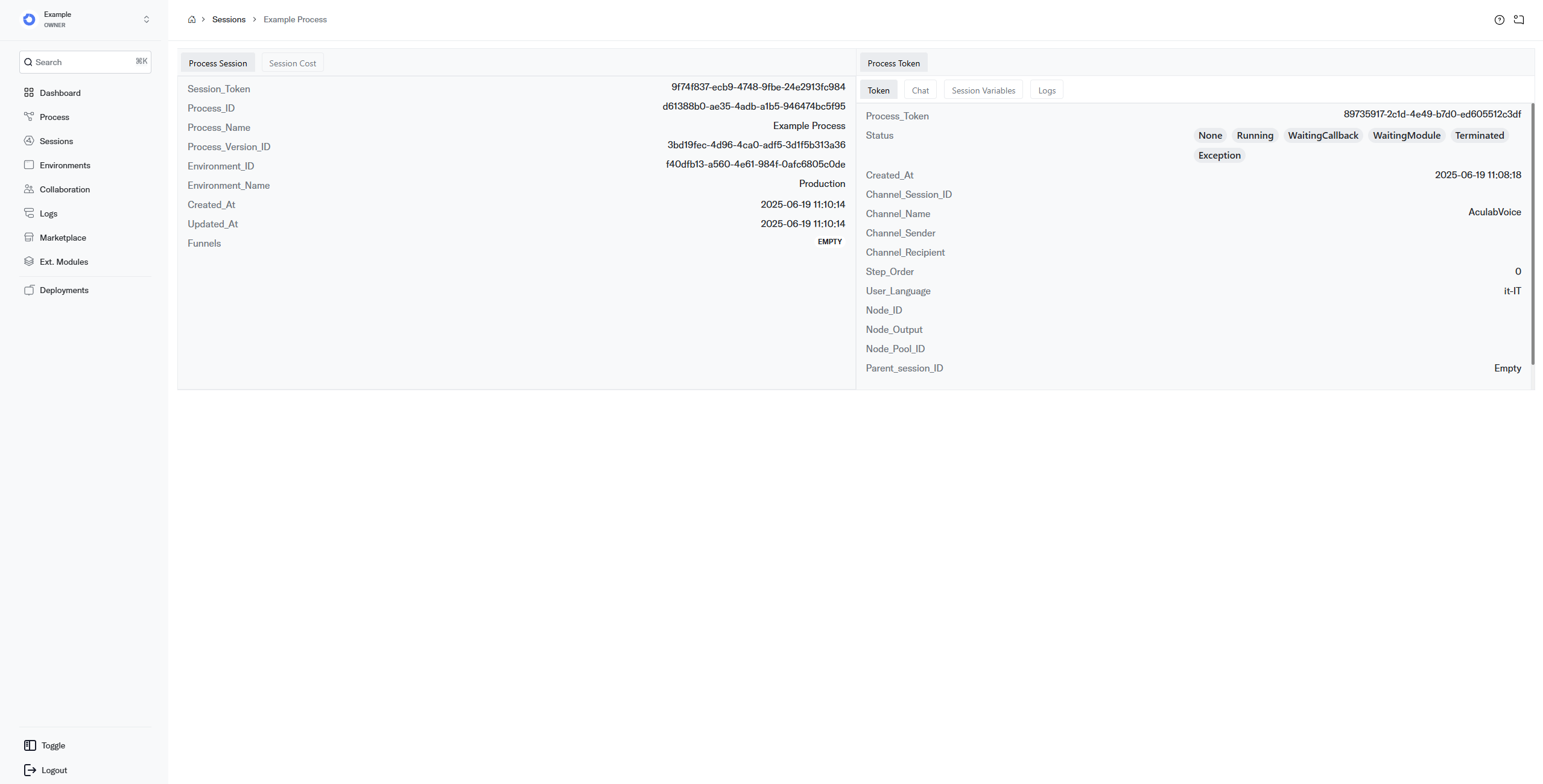
General information about the Session's lifecycle.
- Process Name the Process that generated this Session.
- Environment Name the Environment the Process was deployed to.
- Token State the current state of the Token at the time of data retrieval.
- Completed whether the Session has reached an End Event.
- Test Mode whether the Session was generated by a test Environment.
- Started At date and time the Session was initiated.
- Ended At date and time of the last update to the Session.
- Task the most recently executed Task.
- Task Output the output status of the most recent Task.
- Task Pool the Pool containing the most recently executed Task.
- Execution Count the total number of execution steps in the Session.
- User Language the language used in the Session.
- Channel Name the Channel the Session is running on.
- Channel Session the Channel-level session identifier.
- Channel Sender the sender on the Channel side.
- Channel Recipient the end-user recipient of the Session.
- Tag the outcome tag the workflow set, also shown next to the Environment at the top of the page.
Process Token
A Token is the pointer that moves through your Process and drives execution from node to node.
- Process Token unique identifier of the Token.
- Status the current Token status.
- Created At when the Token was created.
- Channel Session Id the Channel-level session identifier linked to this Token.
- Channel Name the Channel the Token is operating on.
- Channel Sender the sender identity on the Channel.
- Channel Recipient the recipient identity on the Channel.
- Step Order the execution position of the Token. Each operation counts as a step (e.g., an InputTask waiting for user input and then forwarding the data are two separate steps).
- User Language the language the Session is running in.
- Node Id the identifier of the Node currently being executed.
- Node Output the output the Node produced.
- Node Pool Id the Pool to which the current Node belongs.
- Parent Session Id the identifier of a parent Session, if applicable.
Chat
Displays the full conversation transcript that occurred during the Session.
Session Variables
Runtime data attached to the Session, organized by scope:
- Data general Session variables set by Tasks during execution.
- Channel Data data provided by the Channel layer.
- Channel Request Data the raw request payload from the Channel.
- Channel Response Data the raw response payload sent back through the Channel.
Logs
Displays any errors and warnings that occurred during the Session. Each entry includes the error code, message, and timestamp. See Error Codes for a full reference.
Best practices
- Use the Chat tab for quick debugging the conversation transcript is the fastest way to understand what the end user experienced.
- Check Session Variables when outputs are wrong inspect
Datato verify that previous Tasks set the expected values. - Filter by Channel when debugging channel-specific issues, filter the Sessions list by Channel to isolate the problem.
- Filter by Tag to review outcomes tag each way a run can end with SetTagTask, then filter by a tag (for example
escalated) to read exactly the conversations that ended that way.
Related pages
- Logs view error logs across all Sessions.
- Error Codes understand what each error code means and how to resolve it.
- Process manage the Process that generated these Sessions.